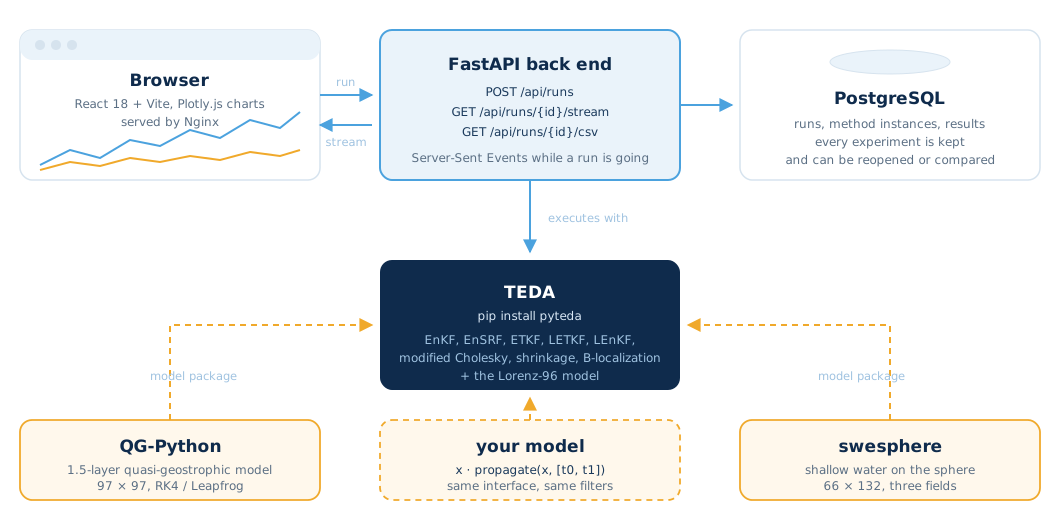
Above: how a run travels through PyTEDA-web. The browser talks to a FastAPI back end; TEDA does the assimilation; the models are Lorenz-96 inside TEDA, or QG-Python and swesphere installed next to it; PostgreSQL keeps every run.
TEDA is a Python library: you write a script, run it, and plot the errors. PyTEDA-web puts the same experiments behind a web page. You pick a model, one or more method instances (the same filter with different localization radii, say), an ensemble size, an observation network and a seed, and launch the run. The back end executes it with TEDA and streams the background and analysis errors to the browser step by step, so you see the filters diverge or converge while they run.
Nothing is lost when the page closes. Each run, its configuration and its results go to a PostgreSQL database, so a benchmark done today can be reopened, compared with another one, or downloaded as CSV weeks later.
TEDA ships the Lorenz-96 system (40 variables, forcing F = 8), which is what the public demo runs. Larger models are not part of TEDA: they are separate packages that expose the same interface, a state vector and a propagate(x, [t0, t1]) call. Two are available today, both from this lab:
Install either one in the back end environment and it appears in the model list.
Every ensemble-based method of TEDA can be run: the stochastic EnKF, its Cholesky and modified Cholesky variants, the shrinkage precision estimator, B-localization, EnSRF, ETKF, LETKF and LEnKF. A run can hold several instances of a method with different parameters, which is how the platform is used for benchmarking.
The front end uses the same HTTP API that scripts can call. These are the entry points of the back end.
| Endpoint | What it does |
|---|---|
GET /api/methods | the assimilation methods available, with their parameters |
GET /api/models | the models the server can run: Lorenz-96 (built in), QG-Python and swesphere when installed |
POST /api/runs | create a run: model, method instances (for example LETKF with r = 1 and r = 2), ensemble size, observation setup, seed |
GET /api/runs | every run stored in the database, with its configuration and status |
GET /api/runs/{id} | one run and its results |
GET /api/runs/{id}/stream | Server-Sent Events: background and analysis errors per assimilation step while the run is going |
GET /api/runs/{id}/csv | download the results as CSV |
The interactive documentation of the API is served by FastAPI at /docs once the back end is running.
pyteda package (filters and Lorenz-96) plus any model package installed next to it.frontend, backend and postgres.git clone https://github.com/enino84/pyteda-web
cd pyteda-web
docker compose up --build # then open http://localhost:3000For development with hot reload, start only postgres and backend with Docker Compose, then npm install && npm run dev inside frontend/ (served at http://localhost:5173).
If PyTEDA-web is useful in your work, we would appreciate a citation. The platform paper describes the architecture; the TEDA papers describe the assimilation library it runs.
PyTEDA-web
Nino-Ruiz, E. D. (2026). PyTEDA-web: A FastAPI platform for interactive data assimilation benchmarking with real-time streaming and persistent experiment tracking. SoftwareX, 34, 102738. doi:10.1016/j.softx.2026.102738
@article{ninoruiz2026pytedaweb,
  title   = {PyTEDA-web: A FastAPI platform for interactive data assimilation
             benchmarking with real-time streaming and persistent experiment tracking},
  author  = {Nino-Ruiz, Elias D.},
  journal = {SoftwareX},
  volume  = {34},
  pages   = {102738},
  year    = {2026},
  doi     = {10.1016/j.softx.2026.102738}
}
TEDA
Nino-Ruiz, E. D. (2025). TEDA: A lightweight Python framework for educational data assimilation. SoftwareX, 31, 102297. doi:10.1016/j.softx.2025.102297
Nino-Ruiz, E. D., & Valbuena, S. R. (2022). TEDA: A computational toolbox for teaching ensemble based data assimilation. In Computational Science, ICCS 2022, Lecture Notes in Computer Science 13353. Springer. doi:10.1007/978-3-031-08760-8_60
pip install pyteda)